
A network incident becomes difficult when we jump between layers without proving where the request stops. This practical guide builds an evidence-first workflow for troubleshooting DNS, routing, NAT, firewalls, reverse proxies, and load balancers in cloud environments. The goal is not to memorize commands. The goal is to isolate the failing boundary, collect evidence, and explain the result clearly during a Senior DevOps interview.
This article uses a simple reference architecture: a client resolves a DNS name, connects to a public load balancer, passes network controls, and reaches application replicas in a private subnet. Outbound access from the private subnet uses a NAT gateway. The same reasoning applies to AWS VPC, Azure VNet, GCP VPC, on-premises networks, and Kubernetes ingress paths.
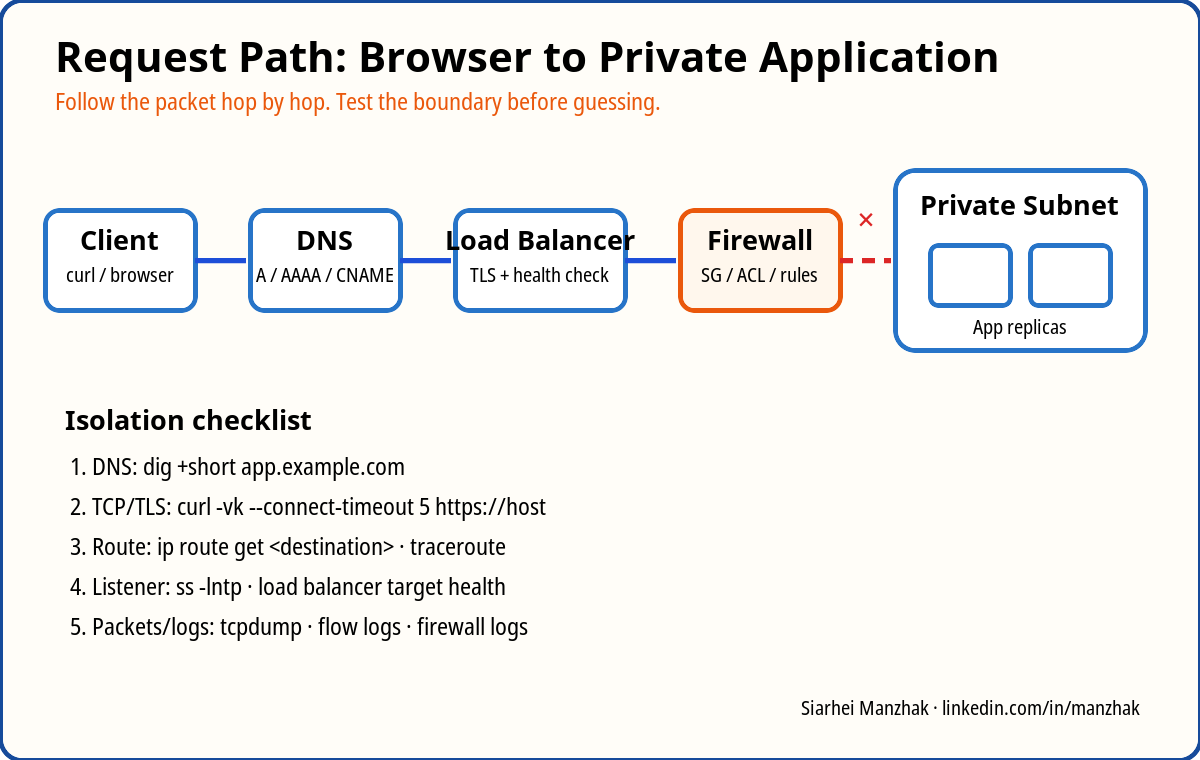
1. Build a mental model before running commands
Start by writing the path as a sequence of boundaries:
# End-to-end request path: trace every boundary from the client to the dependency.At every boundary ask three questions:
- Name resolution: did the client receive the expected address?
- Transport: can it establish TCP and, for HTTPS, complete the TLS handshake?
- Application: does the server return a valid response within the expected time?
This prevents random changes. If DNS returns the wrong address, restarting the application will not help. If TCP cannot connect, changing an HTTP header will not help. If TLS succeeds and the proxy returns HTTP 504, the public route probably works and the investigation should move behind the proxy.
2. Reference lab
You can reproduce the lab with any cloud or with local virtual machines. Use these logical components:
- one public subnet containing a load balancer or Nginx reverse proxy;
- one private subnet containing two application instances;
- a route from the public subnet to an internet gateway;
- a default outbound route from the private subnet to a NAT gateway;
- a DNS record such as
app.lab.examplepointing to the load balancer; - a health endpoint at
/healthreturning HTTP 200; - network rules allowing HTTPS from the internet and the application port only from the load balancer.
For a local version, run two web containers and an Nginx proxy:
# Create an isolated Docker network for the lab.The exact platform is less important than the investigation process. For assessment preparation, deliberately break one layer at a time and record the symptom, evidence, root cause, and fix.
3. DNS: prove what the client resolves
DNS failures often look like application failures because the browser only reports that the site cannot be reached. Begin with the exact resolver used by the affected client.
# Query the configured resolver for the full DNS answer.Check the returned record type, value, TTL, and resolver. An A record should return an IPv4 address; an AAAA record returns IPv6; a CNAME delegates the name to another name. A client may prefer IPv6 and fail even when IPv4 works. Test both explicitly:
# Force an HTTPS request over IPv4 and print connection/TLS details.Common DNS failure scenarios include a stale record after migration, split-horizon DNS returning different answers inside and outside a VPN, an expired private hosted-zone association, negative caching after an earlier NXDOMAIN response, and a broken delegation between parent and authoritative zones.
Do not immediately flush every cache. Compare answers from multiple resolvers first:
# Ask Cloudflare public DNS for the record.If public resolvers return the correct address but the corporate resolver does not, the problem is in the internal DNS chain, not the application.
4. TCP and TLS: separate connectivity from HTTP
After DNS, test whether the target port accepts connections:
# Test whether TCP port 443 accepts a connection.The error tells you where to investigate:
- Connection refused: the address is reachable, but nothing accepts the connection or a firewall actively rejects it.
- Timeout: packets may be dropped by a route, security rule, network ACL, firewall, or an unreachable target.
- TLS certificate mismatch: the listener presents a certificate that does not include the requested hostname.
- Unknown CA or incomplete chain: the server did not provide the correct intermediate certificates, or the client does not trust the issuer.
- Handshake timeout: inspect TLS termination, proxy capacity, packet loss, and MTU-related issues.
Server Name Indication matters when one load balancer serves several HTTPS hosts. Testing only the IP can select the default certificate and produce a misleading result. Always pass the expected hostname with -servername.
5. Routing, subnets, NAT, and return paths
A route determines the next hop for a destination prefix. The most specific matching prefix wins. Inspect the client or server decision with:
# Show addresses assigned to local interfaces.In a cloud environment, compare the operating-system route with the subnet route table. A private application subnet normally has local routes for the VPC CIDR and a default route to a NAT gateway for outbound internet access. The NAT gateway must itself sit in a public subnet with a route to the internet gateway.
NAT is stateful address translation, not a general inbound gateway. A private instance can initiate an outbound connection through NAT and receive the response, but an internet client cannot use that NAT gateway to initiate a connection to the instance.
A classic failure is asymmetric routing: the request enters through one path, but the response leaves through another. Stateful firewalls and NAT devices may discard the response because they do not have matching connection state. Look for multiple default routes, policy routing, VPN routes, overlapping CIDRs, and different paths introduced by peering or transit connectivity.
Packet capture can prove the direction of failure:
# Capture all packets to or from the target host on any interface.If SYN packets arrive but SYN-ACK packets never leave, investigate the listener, local firewall, or return route. If no SYN arrives, move one hop earlier and inspect the cloud flow logs or firewall logs.
5.1 VPN, peering, transit connectivity, BGP, and OSPF
Hybrid and multi-network incidents add another control plane: routes may be learned dynamically rather than entered manually. A VPN tunnel can report “up” while application traffic still fails because the required prefixes are missing, filtered, overlapping, or advertised from the wrong side.
For peering, remember that connectivity is commonly non-transitive. If network A peers with B and B peers with C, A does not automatically reach C. A transit gateway, virtual WAN, hub router, or another routed design is required. Also check whether both sides have return routes and whether DNS resolution across network boundaries is configured separately from IP connectivity.
BGP exchanges reachable prefixes between autonomous systems. In cloud and hybrid environments it is often used for site-to-site VPN, Direct Connect, ExpressRoute, Interconnect, and transit routing. For a Senior DevOps investigation, you do not need to design an internet-scale BGP policy, but you should verify:
- whether the BGP session is established;
- which prefixes are advertised and received;
- whether a more specific route overrides the expected path;
- whether route filters, local preference, AS path, or MED influence selection;
- whether failover changed the forward path but not the return path.
OSPF is an interior link-state routing protocol commonly used inside enterprise networks. It builds a topology database and selects paths using cost. During troubleshooting, check neighbor state, area configuration, interface cost, route redistribution, and whether an expected subnet is included in the correct area. The practical distinction is that OSPF normally handles routing within an organization, while BGP commonly connects routing domains and applies richer routing policy.
Useful evidence depends on the platform. On Linux, inspect routes and neighbors:
# Display the effective Linux routing table.In cloud consoles, inspect effective routes rather than only route-table configuration. Managed services may combine system routes, propagated routes, static routes, and policy rules. Flow logs should be filtered by source, destination, protocol, port, action, and time window. A rejected flow points to a network control; an accepted flow does not prove the application responded, so correlate it with load-balancer, proxy, and application logs.
For VPN troubleshooting, verify the tunnel, security associations, selectors, encryption domains, MTU, and prefix advertisement. Small packets may work while large TLS requests fail because encapsulation reduces the effective MTU. Test with controlled packet sizes and do not assume that a successful ping proves that application traffic is healthy.
6. Firewalls, security groups, and network ACLs
Document the intended flow as source, destination, protocol, port, and direction. “Allow HTTPS” is incomplete without the source and target.
# Expected public flow: internet clients reach TCP 443 on the load balancer.Cloud security groups are commonly stateful: return traffic for an allowed connection is automatically accepted. Network ACLs and traditional firewalls may be stateless and require explicit return-path rules, including ephemeral ports. On Linux inspect the effective rules instead of assuming the configuration was applied:
# Print the complete nftables ruleset.Also confirm that the process listens on the expected interface. A service bound to 127.0.0.1:8080 will work locally but not from the load balancer:
# List listening TCP sockets and their owning processes.7. L4 versus L7 load balancing
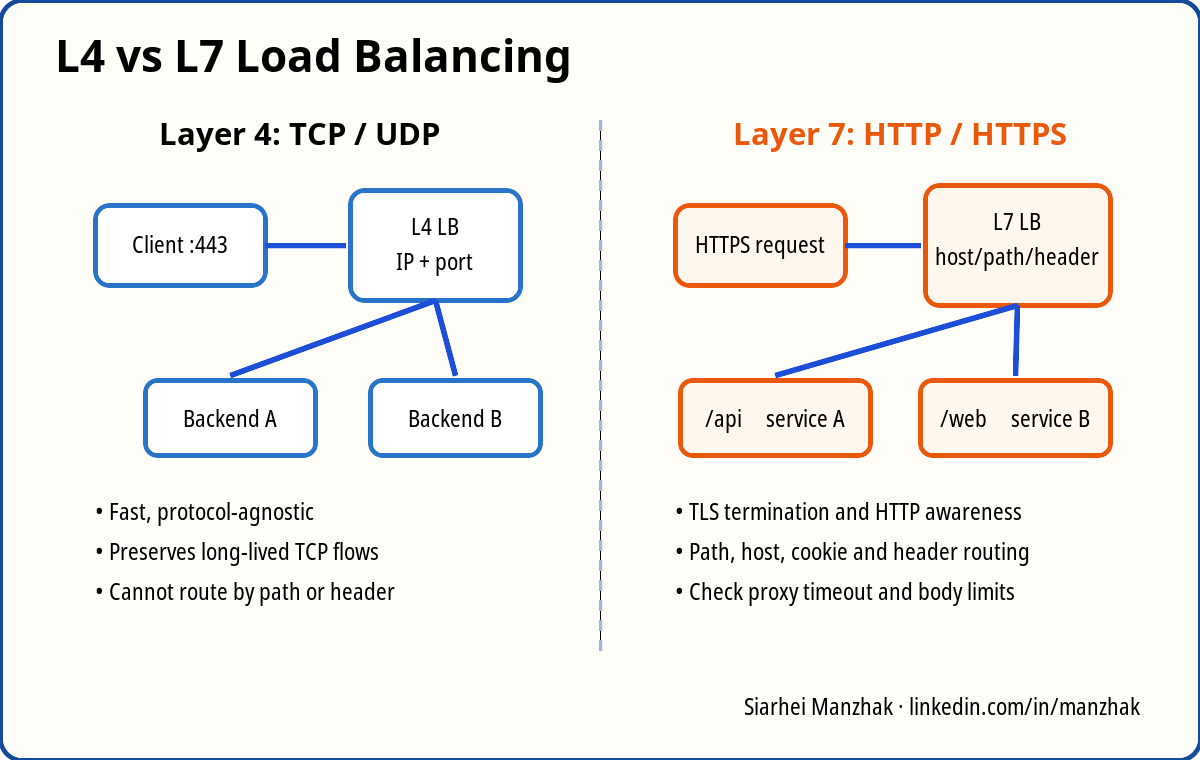
A Layer 4 load balancer distributes TCP or UDP connections using addresses and ports. It does not need to understand HTTP. It is suitable for generic TCP, very high throughput, and some long-lived connections.
A Layer 7 load balancer parses HTTP and can route by hostname, path, header, cookie, or method. It can terminate TLS, redirect HTTP to HTTPS, inject forwarding headers, enforce body-size limits, and apply web security controls. That power adds more configuration and more failure modes.
When troubleshooting a load balancer, inspect:
- listener port and protocol;
- TLS certificate and hostname;
- target group port;
- health-check path, method, expected status, interval, and timeout;
- backend security rule;
- connection draining or deregistration delay;
- idle timeout for long requests, WebSockets, or gRPC;
- proxy headers such as
X-Forwarded-ForandX-Forwarded-Proto.
A frequent mistake is protecting the health endpoint with authentication. The application works for an authenticated user, but the load balancer receives HTTP 401 and removes every target. Use a minimal endpoint that verifies essential dependencies without exposing sensitive information.
8. Reverse proxies and HTTP evidence
Once TCP and TLS succeed, capture the complete HTTP exchange:
# Fetch response headers and show verbose TLS/HTTP details.The timing output separates slow DNS, connection establishment, TLS, and backend response time. HTTP status codes narrow the investigation:
- 301/302 loop: proxy and application disagree about the original scheme or host.
- 401/403: authentication, authorization, WAF, or path rules rejected the request.
- 404: wrong host/path routing or the application does not expose the route.
- 413: request body exceeds a proxy or application limit.
- 502: proxy could not obtain a valid response from the upstream.
- 503: no healthy targets or service unavailable.
- 504: upstream did not respond before the proxy timeout.
Correlate the request across layers with a request ID. The proxy should accept or create an ID, forward it to the application, and include it in structured logs. Without correlation, engineers waste time comparing unrelated log lines.
9. Five failure experiments
Experiment 1: wrong DNS target
Change the lab record to an old load-balancer address. Confirm that dig returns the wrong value while direct access to the new address works with curl --resolve. Root cause: DNS configuration, not the application.
Experiment 2: blocked backend port
Remove the rule allowing the load balancer to reach TCP 8080. The public TLS handshake still succeeds, but target health fails and the client receives 503 or 504. Flow logs show rejected traffic between the load balancer and application.
Experiment 3: incorrect health-check path
Configure /healthz while the application exposes /health. Direct requests to the application succeed; the load balancer marks targets unhealthy. The health-check status and application access logs provide the evidence.
Experiment 4: broken private-subnet default route
Remove the route to the NAT gateway. The application still accepts inbound traffic from the load balancer but cannot reach an external API or package repository. Internal connectivity works, while outbound connections time out.
Experiment 5: reverse-proxy timeout
Make an endpoint sleep longer than the proxy timeout. Fast endpoints work, the slow endpoint returns 504, and the application may finish after the proxy has already closed the client connection.
10. Evidence-first troubleshooting flow
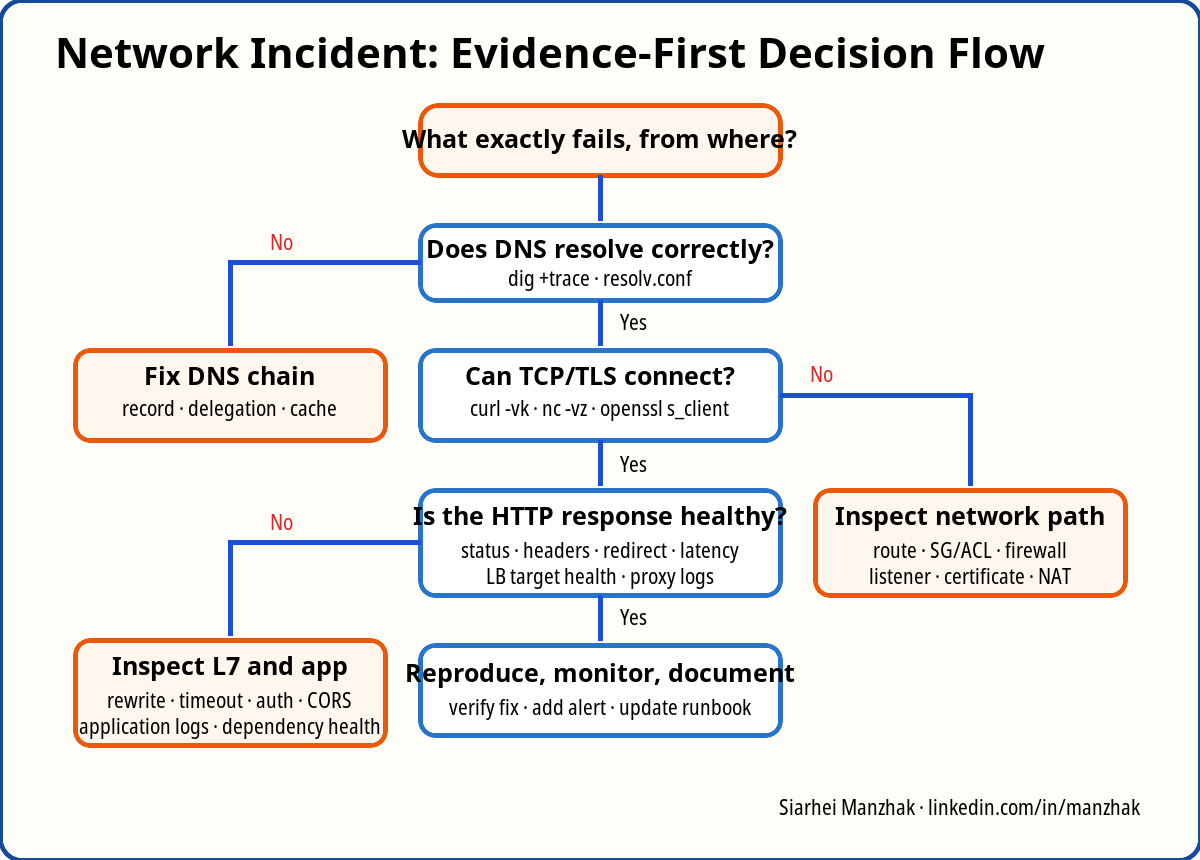
During an incident, keep a timeline with the observed symptom, scope, last known good time, recent changes, tests, and results. Change one variable at a time. If you make several changes before retesting, you may restore service without learning the root cause.
A concise status update should contain:
Impact: external HTTPS requests to the API time out; internal health checks are successful. Evidence: DNS resolves to the expected load balancer, TLS completes, but the target group is unhealthy and flow logs show rejected TCP 8080 traffic. Current hypothesis: the backend security rule was removed during the last infrastructure deployment. Next step: compare the Terraform plan with the effective rule and restore the least-privilege load-balancer-to-application rule.
11. Assessment questions and short answers
- Why can DNS work while the application remains unreachable?
Short answer: DNS only maps a name to an address. TCP, TLS, firewall rules, routing, load-balancer health, or the application can still fail afterward. - What is the difference between connection refused and connection timeout?
Short answer: Refused usually means the host replied but no service accepted the port, while a timeout usually means packets or replies were silently dropped or could not be routed. - Why does testing an HTTPS service by IP sometimes show the wrong certificate?
Short answer: Shared HTTPS listeners use SNI to select a certificate. An IP-only request may receive the listener’s default certificate. - How does longest-prefix route selection work?
Short answer: The router chooses the matching route with the most specific network prefix; for example, a /24 wins over a /16 and the default /0. - Why does a private subnet need NAT for outbound internet access?
Short answer: Private addresses are not internet-routable. NAT translates the source to a public address and keeps state for returning traffic. - What creates asymmetric routing, and why can a stateful firewall reject it?
Short answer: Different forward and return paths can be caused by multiple gateways, VPNs, policy routes, or dynamic routing. A stateful device on only one path cannot match the returning packet to the original connection. - How do stateful security groups differ from stateless ACLs?
Short answer: Stateful controls automatically permit response traffic for an allowed connection. Stateless ACLs evaluate each direction independently and require explicit return rules. - When would you choose an L4 load balancer over L7?
Short answer: Choose L4 for generic TCP/UDP, very high throughput, protocol transparency, or when HTTP-aware routing and TLS termination are unnecessary. - What can make every load-balancer target unhealthy even when the process is running?
Short answer: A wrong health path or port, authentication on the endpoint, unexpected status code, insufficient timeout, blocked backend rule, or binding only to loopback. - What evidence distinguishes a proxy timeout from a DNS problem?
Short answer: A proxy 504 with successful DNS, TCP, and TLS proves the request reached the proxy; DNS failure occurs before a connection to the proxy is established. - How would you troubleshoot connectivity through a VPN or peering connection?
Short answer: Verify both-side routes, advertised prefixes, non-overlapping CIDRs, tunnel/BGP state, security rules, return paths, flow logs, and MTU. - What information should a useful incident update contain?
Short answer: Impact, scope, timeline, confirmed evidence, current hypothesis, recent changes, mitigation, next action, owner, and the time of the next update.
12. How to answer at Senior DevOps level
A strong answer is structured and evidence-based:
- State the request path and the affected scope.
- Start at the failing client, not at a random server.
- Verify DNS, TCP, TLS, and HTTP separately.
- Inspect the effective route and controls on both forward and return paths.
- Use flow logs, packet capture, proxy logs, and application logs to confirm the boundary.
- Explain the smallest safe fix and its risk.
- Verify recovery from the original client.
- Add a preventive action: monitoring, policy check, test, or runbook improvement.
This approach demonstrates more than command knowledge. It shows that you can separate symptoms from causes, reduce the search space, communicate impact, and improve the system after recovery.
Practical assignment
Build the lab, create all five failures, and keep a table with these columns: symptom, hypothesis, command or data source, evidence, root cause, fix, and prevention. Then explain one incident aloud in five minutes without reading commands. That exercise is closer to a Senior DevOps interview than memorizing definitions.